
Make payments, renew your policy, lodge claims and more online, 24/7.
Quick access to online services


Manage your Car or Home Insurance policy online

My Allianz
Skip the queue! Log in to My Allianz to manage your Car, Home or Landlord Insurance policy online. The details you can access and update depends on your policy type.

Allianz Chat
Get the support you need, without having to wait. Have the freedom to start, pause and resume the conversation whenever you want.
Our webchat agents can help with more complex questions between 8 AM and 11 PM AEDT Monday to Friday.

Call or send us a message
If you have any questions or need to contact us about your policy, our team is here to help. You can call us or use our online form to send us a message. Find out about other ways to connect with us.
We're here for you
We’re all likely to experience vulnerability at some point in our lives. This vulnerability may result from life events, such as an illness, natural disaster, or loss of income. Other factors may be longer term – such as a disability or financial distress.
We’re committed to supporting customers through these tough times with respect, flexibility, dignity and care. This means we’ll make reasonable adjustments and put in place appropriate support to take account of these needs and provide access to flexible options.
Family violence
If you’re experiencing family or domestic violence, we’re here to support you with compassion, respect, flexibility and care. Find out about the support we can offer you through our Family Violence Policy.
Financial hardship support
We have policies and training for employees to help them identify if you’re experiencing financial hardship and decide how we may be able to provide support to you.
Losing a loved one
Coping with the loss of a loved one is one of life's biggest challenges. We've created a guide to take you through the steps to manage any insurance policies you have, so you have more space to grieve.
Customer Counselling Program
We offer free, confidential counselling support to our customers, distribution partners and their families who have been affected by a natural catastrophic event.
Avoid being scammed
Have you received an email from us that looks suspicious? If you think you've been sent a scam email, don’t click on any links, delete the email, and report it to us immediately.
Support services
Even if we’re unable to help you, there are a range of support services out there that will be able to. No matter your situation, don’t hesitate to reach out to the following organisations.
1800RESPECT
National 24-hour domestic and family violence and sexual assault line.
Call 1800 737 732
MensLine Australia
24/7 support, information and referral service for men with family and relationship issues.
Call 1300 78 9978
Beyond Blue
24/7 support to people experiencing anxiety or depression.
Call 1300 224 636
National Debt Hotline
Financial counselling is a free, confidential service to help people in financial difficulty.
Call 1800 007 007
National Association of Community Legal Centres
A not-for-profit, community organisation providing legal and related services to the public.
NewAccess for Small Business Owners (NASBO)
A guided self-help mental health coaching program. It’s free, confidential and convenient. Available nationally by phone or video call.
Call 1300 224 636
Your feedback matters to us
Want to cancel your policy?
We’re sorry you’re thinking about leaving us. If you’d like to discuss your options, our team can review your policy with you.
To cancel your Car, Home or Landlord policy, chat online to our team. If your policy starts with AALHH or AALMV, you can cancel online, log in to My Allianz.
For all other policies, call us or fill in our contact form.
Have a complaint?
You can let us know you’re unhappy with our products or services by filling in our complaints form. We’ll try to resolve any issues as quickly as possible.

Manage marketing emails
Did you know you can opt out of our general marketing emails or letters? Don’t worry, we’ll still send you important updates about your insurance.
Frequently asked questions
Payments
If you pay your premiums monthly and you’ve missed a payment, you may have received a text, email or letter from us asking you to make a payment. The easiest way to make a payment is online using your Biller Reference Number (BRN).
For Car or Home Insurance policies that start with BC or AALHH, you can also log in to My Allianz to make a payment.
If you don’t make a payment, we’ll try to take a double payment on the next instalment date. It’s important to make sure you have enough funds on your next instalment date. If we can’t make two direct debits in a row, we may cancel your policy. Don’t worry, we’ll let you know if the payment fails a second time and before cancelling your policy.
If your payment fails twice, you can still make a manual payment online or by calling our team as long as the policy is still active.
You may want to also check and update your payment details.
You can choose to pay your Allianz Insurance policy by direct debit using a credit card, debit card or bank account.
If you’re making a payment online – we accept payment using debit or credit cards.
For Car, Home, Landlord, and Renters Insurance policies bought directly from Allianz, primary policyholders can update their payment details online through My Allianz. Log in to My Allianz using the email address and phone number linked to the policy.
For all other insurance types, call us on 13 10 00 to update your payment details.
The easiest way to make a payment is online using your Biller Reference Number (BRN). You’ll find your BRN on your renewal or payment notice. If you pay your insurance annually, you can also make a payment at the post office.
If you pay your insurance premiums monthly and your policy is up for renewal, you don’t need to do anything. We’ll continue to direct debit the payment details on file.
Your Biller Reference Number (BRN) is located on your payment or renewal notice. You’ll need this to make a payment online.
NSW CTP (Green Slip)
See the first page of your Green Slip Certificate
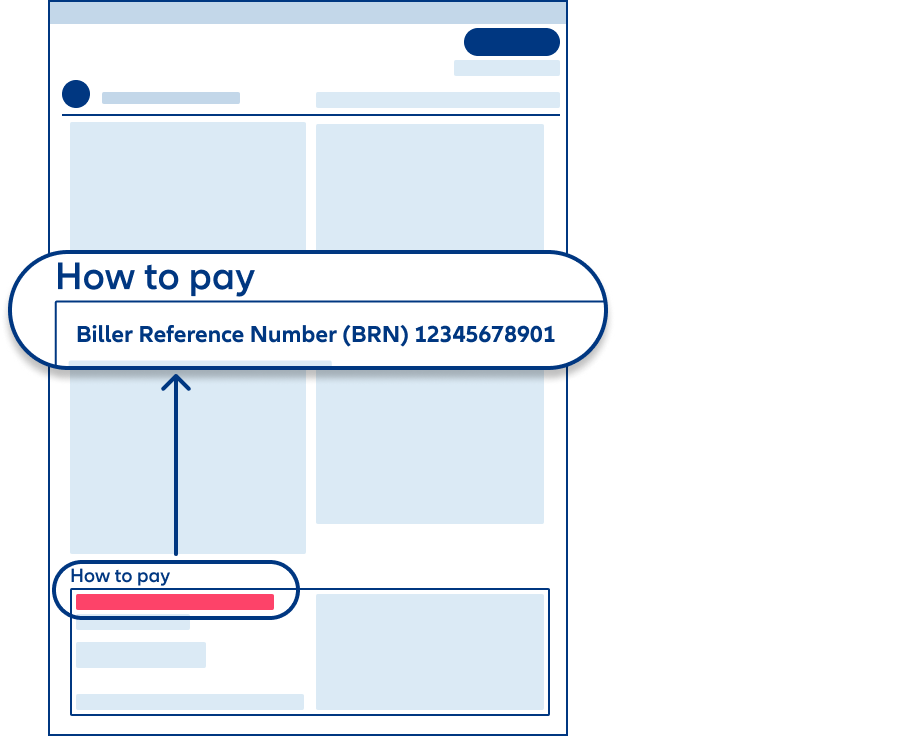
Car and Home policies: AALH, AALMV, or BC
See the second page of your renewal notice
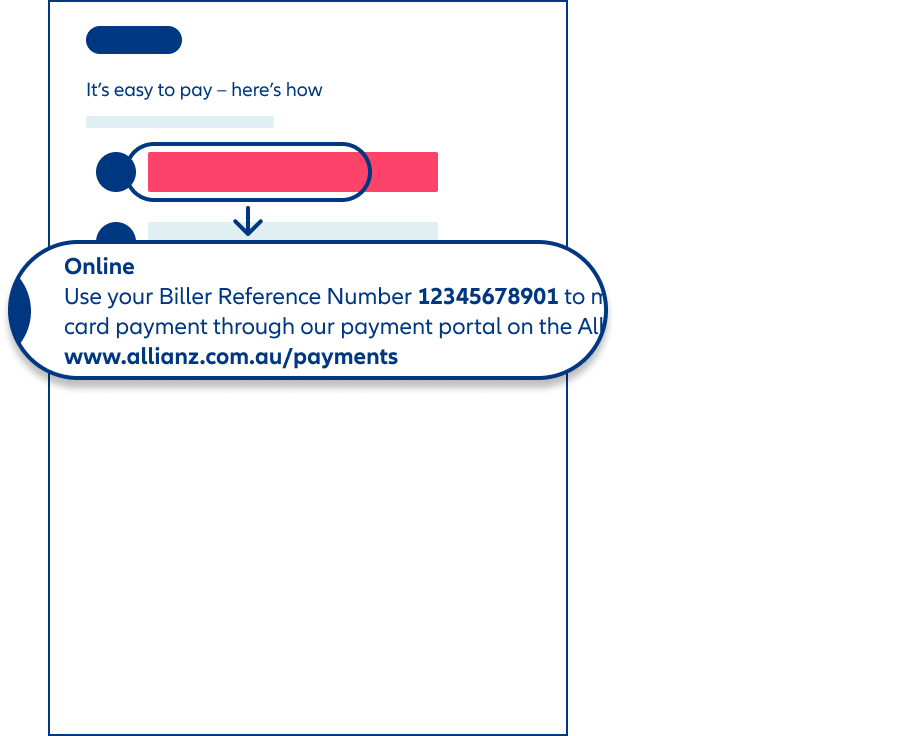
All other Car and Home policies
See the second page of your renewal notice
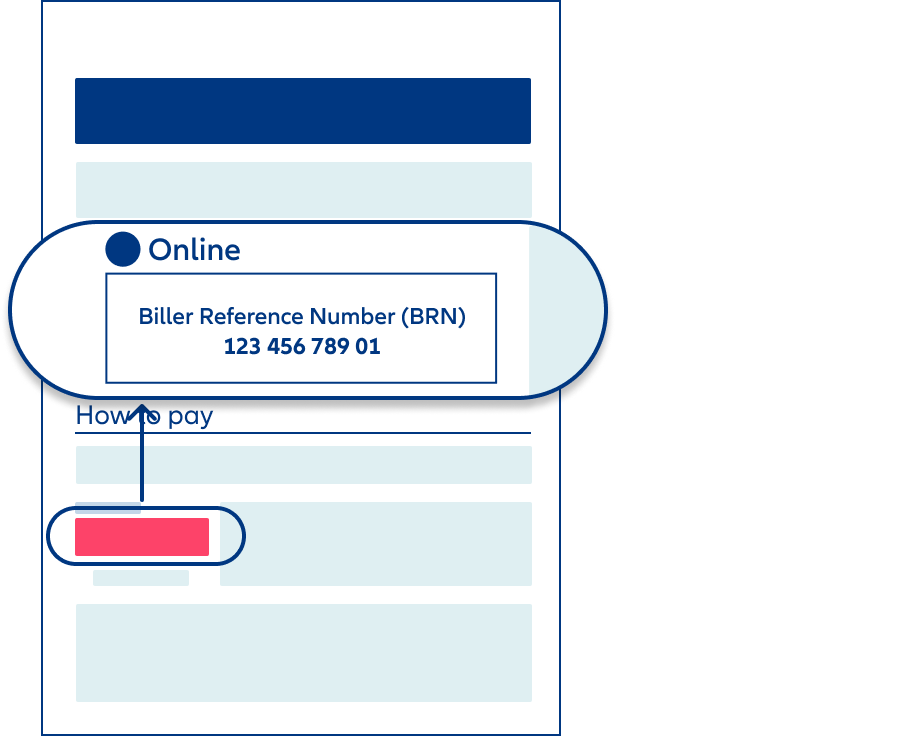
Managing your policy
Yes, you can renew your Allianz Insurance policy securely online. Depending on your policy, you may be able to renew it in My Allianz or make a payment online.
To learn more, see How to renew your policy.
Before you cancel, our team can help you review your policy to make sure you’re only paying for what you need while keeping you covered.
If you need to cancel your policy, you can do so at any time without a cancellation fee. We’ll refund any unused premiums; the amount will depend on your policy type. You can only cancel your CTP Insurance if the car’s registration has been cancelled.
For Car, Home, Landlord and Renters Insurance policies bought directly from Allianz, the easiest way to cancel your policy is through Allianz Chat. If you Home or Car Insurance policy starts with AALHH or AALMV, you can cancel your policy online, log in to My Allianz.
For all other policy types, you can use our online contact form and we’ll reply by email. To find out more, see how to cancel your insurance.
For Car, Home, Landlord and Renters Insurance policies, you can get a copy of your Certificate of Currency online through My Allianz. If your policy number begins with AAL or BC, you can also update your Certificate of Currency online through My Allianz. Log in to My Allianz using the email address and mobile number linked to the policy.
For all other policies, call us on 13 10 00 to update your Certificate of Currency with new lender details or obtain a current copy.
If you bought your policy directly from Allianz, you can get a copy of your PDS online, refer to our Policy documents.
For Car, Home, Landlord or Renters Insurance policies, the primary policy holder can access other policy information online through My Allianz. They can log in to My Allianz using the email address and mobile number linked to the policy.
For all other policy information for other policy types, call us on 13 10 00.
Refunds
Processing times for refunds can be different depending on the payment method, your bank and if you have any outstanding balances or open claims. Refunds typically take between 10 to 15 business days to be fully processed and received into your account.
If you don’t receive your refund after 15 business days, you can call us on 13 10 00 to check the status.
We’ll contact you about your refund if we don’t have your bank details. Depending on your preferred contact method, we’ll send you an email or a letter asking you to call us.
When you call us, we’ll ask you a few questions to make sure it’s you before we update your bank details. We’ll never ask for your passwords or codes.
If we don’t hear from you, we’ll send you a text message (SMS). If we still don’t from you, we’ll call you to arrange the refund.
We’re moving away from issuing cheques to make payments. This is in line with the Australian Government’s intention to phase out cheques by 2030. If you currently receive cheques from us, we’re here to help you switch to digital payments.
We keep a register for unclaimed money, as required by law. Learn more about how and where to claim your money.
Premiums and discounts
My Allianz
Only Car, Home, Landlord and Renters Insurance policies bought directly from Allianz can be accessed through My Allianz.
If you bought your Car, Home, Landlord or Renters Insurance policy directly from Allianz, you can log in to My Allianz using the email address and mobile number linked to the policy. We’ll use these to send you a code to confirm your identity.
If you’re having trouble logging in or need help updating your login details, you can contact us on 13 10 00.
Claims
The fastest way is to make a claim online. If you prefer to talk through your claim, you can give our friendly claims team a call on 13 10 13.
You’ll need some details to start your claim. Here are some of the things we’ll ask for:
- Incident details: what happened, the date, time, and location of the incident
- Damage details: a description of the loss or damage you’re claiming for, with photos of the damage, if available
- Proof of the loss: for a contents claim, purchase receipts, credit card statements, and owners’ handbooks can help
- Other details: any additional details you can provide, for example details of witnesses, other vehicles or property involved
Find out more about how to make a claim online.
When you submit your claim, one of our consultants will contact you with the next steps. We’ll review the details you’ve provided and let you know if we need anything else.
We’ll aim to contact you within the following times to guide you through next steps:
- Car, Home, Boat, Caravan, Trailer and Business Insurance claims: within 2 business days
- Travel Insurance claims: within 10 business days
During extreme weather or other significant events, it may take a little longer.
Claims processing times can vary depending on the nature of the claim. For an update on your claim, give our team a call on 13 10 13.
Follow us on
Allianz acknowledges Aboriginal and Torres Strait Islander peoples as the Traditional Custodians of the lands on which we live and work across Australia. We pay our respect to First Nations Elders past and present.
Any advice here does not take into account your individual objectives, financial situation or needs. Terms, conditions, limits and exclusions apply. Before making a decision about this insurance, consider the relevant Product Disclosure Statement (PDS)/Policy Wording and Supplementary PDS (if applicable). Where applicable, the PDS/Policy Wording, Supplementary PDS and Target Market Determination (TMD) for this insurance are available on this website. We do not provide any form of advice if you call us to enquire about or purchase a product.
Allianz Australia Insurance Limited ABN 15 000 122 850 AFS Licence No. 234708 is the insurer of any general insurance products offered, and Allianz Australia Life Insurance Limited ABN 27 076 033 782 AFS Licence No. 296559 is the insurer of any life insurance products offered. Each entity is responsible for any statements and representations made about its products, on this website.